1Password has a new tool designed to counteract the advantages AI has given to phishing scammers. A new feature for the company’s browser extension gives you a “second pair of eyes” to help you catch a bogus website before entering your login info.
Before AI, phishing attempts often included telltale signs like obvious typos or rudimentary graphic design. Now that AI makes it much easier to design and code convincingly, scams are on the rise. According to Fortune, 60 percent of companies reported an increase in fraud-related losses from 2024 to 2025. And the advent of AI browsers could make things even worse.
“Our new phishing feature adds an extra layer of protection,” 1Password says. Once the feature is activated, the extension actively watches for suspicious sign-ins. To be clear, even before this feature’s arrival, 1Password wouldn’t autofill saved credentials for a bogus website impersonating it. But that still left room for people to manually paste their login info, handing it over to those with the worst intentions.
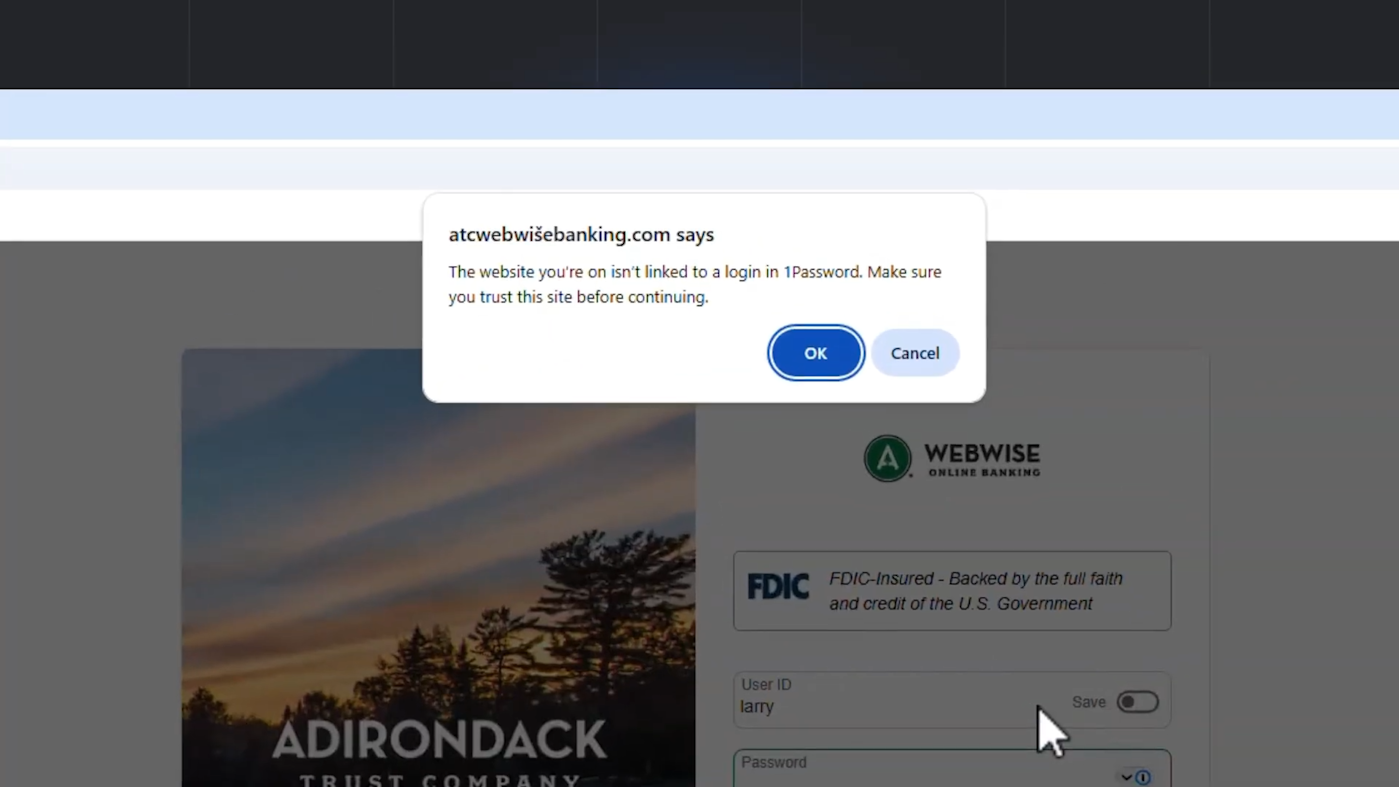
That moment when you try to paste your login manually is where the new feature comes in. “The website you’re on isn’t linked to a login in 1Password,” the feature’s warning pop-up reads. “Make sure you trust this site before continuing.”
1Password says that’s the “breakthrough” moment that can help you avoid a major hassle. “That single moment of pause, that tiny bit of friction, is often all it takes to disrupt the attackers’ entire plan.”
The new feature is available today. You can enable it in the 1Password browser extension’s settings. Under the Notifications section, activate the setting for “Warn about pasted logins on non-linked websites.”
This article originally appeared on Engadget at https://www.engadget.com/cybersecurity/1password-adds-an-extra-layer-of-phishing-protection-140000293.html?src=rss